Batch Rendering with RenderWarrior
chema
Dear Mavericks,
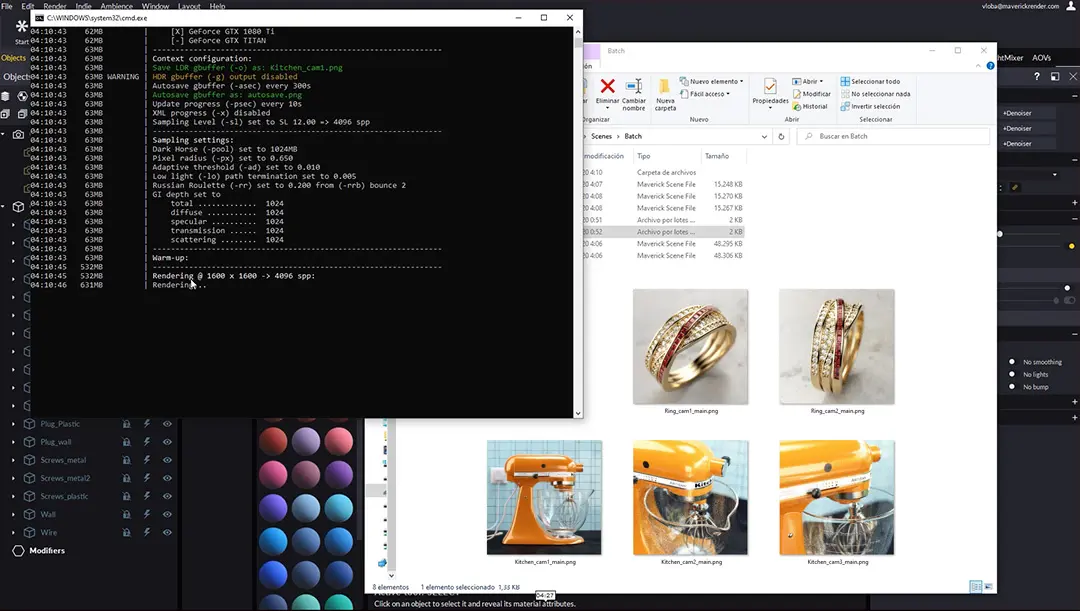
Many of you have asked our support team for instructions on how to do Batch Rendering in Maverick. We have addressed this subject in a video tutorial we uploaded a couple of days ago on your Youtube channel:
Maverick Studio includes since the beginning a command-line (CLI) version of Maverick. This CLI application is called RenderWarrior.
RenderWarrior renders an existing .mks and produces an output image. It supports a plethora of arguments (switches and flags) which you can display by running from a DOS box the command:
renderwarrior.exe -help
There are plenty of options to control resolution, settings, output format, etc... For example:
renderwarrior.exe -i:"Z:\\myscene.mks" -o:"Z:\\myrender.png" -w:1024 -h:768 -sl:10
``

Like every CLI application on Windows, you may create a .bat (batch) file and chain sequential calls to RenderWarrior. This is an easy way to render one scene after another; or in a scene with multiple cameras, one camera shot after another.

We have created a few .bat files for you, which you can easily edit as you need, and then use in your own scenes. The video above gets into the details on how to do this.

Thank you all for watching!

Chema Guerra
CEO & Lead Engineer
Workflow
Rendering
CLI